Creating your Project#
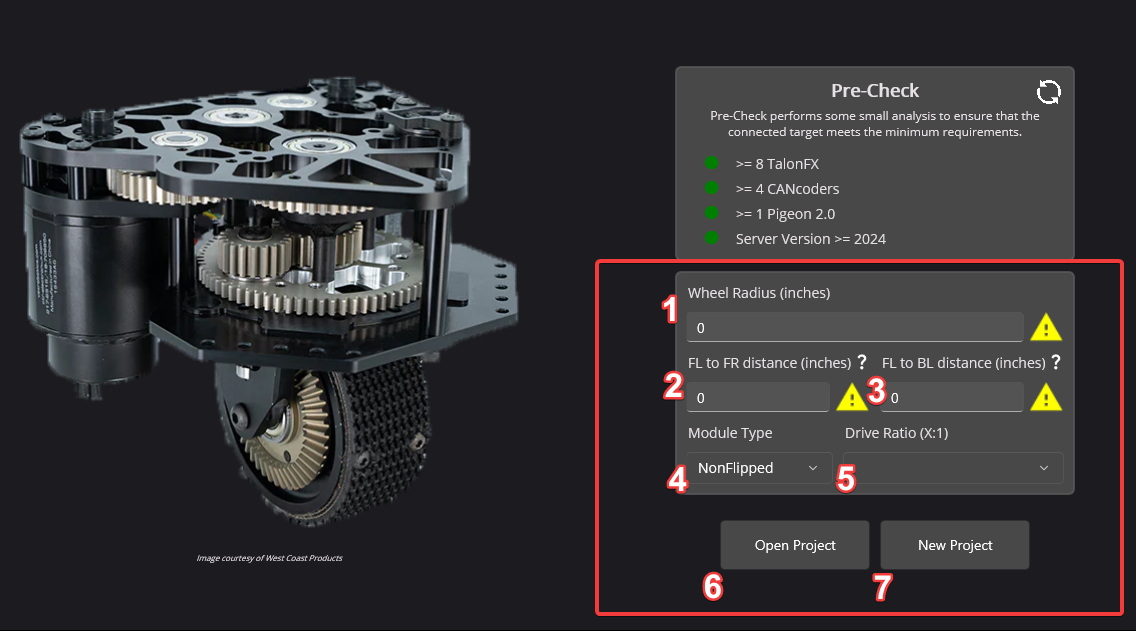
Wheel Radius (inches)
The radius can be found by measuring the width of the module wheel, then dividing that by 2.
FL to FR distance (inches)
This is the distance between the center of the front-left module, and the center of the front-right module.
FL to BL distance (inches)
This is the distance between the center of the front-left module, and the center of the back-right module.
Module Type
Whether or not the Swerve X module is flipped, unflipped, or flipped gear. Users not using Swerve X modules should select Manual instead.
Drive Ratio
This is the gearing ratio between the output shaft of the motor and the module wheel. Swerve X users can find that information here.
Steer Ratio (non-WCP Swerve X)
This is the gearing ratio between the output shaft of the steering motor and the azimuth gear. Users must calculate this based on their gearing themselves, or consult their manufacture.
Open Project
Open an existing Tuner swerve project save file.
New Project
Create a new project based on the settings configured.
Users should configure the settings applicable for their robot and click New Project once they are done.
Tip
Throughout the application is various tooltips, that when you hover on them, provide instructions. If you are unsure on what something means, try hovering on it!
Wizard Options#
Once a project is open, a couple of options are exposed at the top-right.
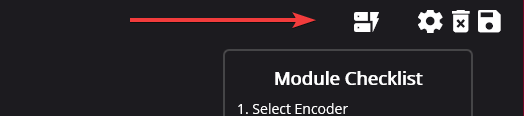
In order from left to right:
Factory default all devices
Open the swerve config menu
Exit project
Save project